nugs
- 4.7
- Rating
- 500.00K
- Installs
- Free
- Price

 Analysis by App-foxy
I approached nugs as someone looking for a better way to follow live music rather than another general-purpose music player. That distinction matters. The app is built around concert recordings, live video, and livestreams, so its appeal depends less on having every possible studio release and more on whether you enjoy hearing performances as they happened in front of an audience. In my experience, that focus gives it a clear identity, but it also means the first few minutes can feel less familiar than opening a standard streaming service.
It is a free Music & Audio app from nugs.net, available to everyone by age rating, with optional purchases ranging from $2.99 to $279.99 per item. The broad audience is obvious from its reach: it has passed 500 thousand installs and holds a 4.6 average from roughly 7 thousand ratings. Those figures suggest a well-established service, but they do not remove the need to understand how it fits your listening habits. I would recommend trying it if live recordings are the reason you press play in the first place.
What makes the live-music focus useful
The strongest part of the experience is the change in listening perspective. A studio track is usually polished toward consistency, while a concert recording preserves the sense that something happened once, in a particular room, with a particular crowd. I found that especially enjoyable when I wanted background music that still felt active. The small variations in performance make familiar songs easier to return to, and the audience atmosphere can make a recording feel more like a memory than a file.
You May Also Like

 Blood Strike: 2.5 Anniversary
Blood Strike’s Loadouts Turn Every Drop Into a Tactical Gamble
A close look at Blood Strike’s custom loadouts: how fast access to signature weapons reshapes its battle royale rhythm, rewards preparation, and narrows the gap between fights.

 Pandora - Music & Podcasts
Pandora’s Music Is Easy to Start, but Harder to Recover
Pandora’s strength is its low-effort path from a seed to a station. Its weak spot is how much confidence it asks you to place in connection, setup, and quiet recovery.

 8 Ball Pool
 Is Built on Rivalries, Rematches, and Routine
A close look at the rivalries, rematches, shared routines, and unanswered safety questions that turn a quick pool match into a persistent mobile community.

 Samsung Music
’s Quiet Strength Is Playing What You Already Own
Its reach comes less from spectacle than from dependable access to a personal library. That simplicity is both the app’s strongest retention engine and its ceiling.

 AccuWeather: Weather Radar
AccuWeather Review: A Quick, Clear Forecast for Everyday Decisions
For everyday plans, the best forecast is the one you can understand quickly. AccuWeather makes rain timing, radar, and local conditions easy to act on, with a few trade-offs.

 Hill Climb Racing
Why Hill Climb Racing Still Turns Crashes Into One More Run
A tiny car, a bumpy hill and one more upgrade: Hill Climb Racing keeps resurfacing because its simple chaos makes every near-miss feel personal.
More From Our News Desk
View All News


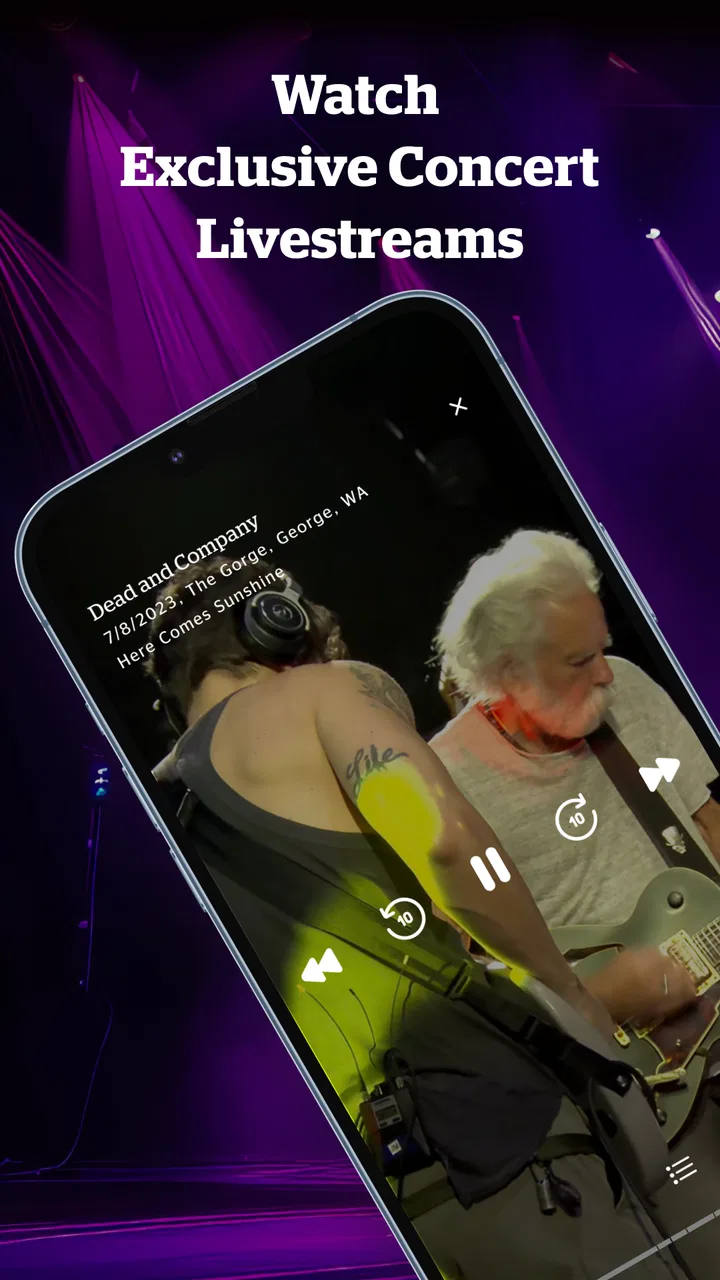
That focus also makes the app more practical for people who follow tours, collect live versions, or prefer full performances to isolated singles. Instead of treating a concert as a promotional extra, nugs places the event itself at the center. Audio is useful when I am commuting or working, while video and livestreams are more appropriate when I have time to watch. Switching between those kinds of listening is one of the app’s most meaningful advantages over a typical service built mainly around albums and playlists.
There is a trade-off, though. If your priority is a large mix of studio albums, algorithmic discovery, podcasts, radio, and spoken-word content, a mainstream music subscription will probably feel more complete. nugs is easier to understand when you think of it as a destination for live performance culture. I would not choose it as my only audio app unless live music made up most of my listening.
Where the first session can become confusing
The likely friction is not the concept but the way a live-focused catalog asks you to browse. A user who expects to type a song title and immediately find the familiar studio version may instead need to think in terms of artists, shows, recordings, videos, or broadcasts. That is not a flaw in the idea, but it requires a small adjustment: search for the performance context, not just the song.
I also recommend deciding what you want before opening the app. If I am looking for something to hear casually, I start with an artist or a concert recording. If I want to watch, I look for video or a livestream rather than treating every result as interchangeable. This simple distinction prevents the common disappointment of selecting an audio recording when I was actually hoping for a visual experience.
Another point is the difference between free access and optional purchases. The app itself costs nothing to install, but individual items can involve in-app spending. I would inspect the purchase step carefully before confirming anything, especially when browsing quickly through recordings or event-related material. For a casual listener, that may be enough reason to use nugs selectively rather than assuming it works exactly like an all-inclusive subscription service.
Checks I would make before blaming playback
When a live stream or recording does not behave as expected, I start with the ordinary checks. I confirm that the device has a stable connection, close and reopen the app, and try another piece of content. Testing a different recording is useful because it separates a general playback problem from an issue connected to one particular item or event.
I also check whether I am trying to use audio, video, or a livestream. These formats make different demands on a device and connection, so a video that struggles may not tell me anything about ordinary audio playback. If audio works but video does not, I treat that as a narrower problem and avoid changing every setting at once. A controlled test is faster than guessing.
For a purchase-related problem, I first verify whether the transaction actually completed before trying again. Repeating a tap can create unnecessary confusion, particularly when the app or connection is slow to respond. I keep the item name and the time of the attempt in mind, then check the relevant account or device purchase record before taking another action. That is a sensible habit with any app offering individual digital purchases.
It is also worth checking the basics of the account being used. If content appears available on one device but not another, I make sure both sessions use the same account and that I have allowed the app time to refresh. I avoid assuming that reinstalling will solve an account or purchase mismatch. Reinstallation can clear local problems, but it does not replace checking which account is active.
A calmer way to recover a broken workflow
My preferred recovery order is simple: stop the current action, test a different item, restart the app, and then return to the original content. This sequence helps identify whether the problem is tied to the recording, the format, or the session itself. If the app resumes normally after reopening, I continue with one short test before starting a long livestream or committing to a purchase.
For livestreams, I would join early enough to test the connection rather than waiting until the event is already underway. I keep other high-bandwidth activity to a minimum and avoid switching repeatedly between networks during playback. These are general precautions, but they matter more for a live event because there is less flexibility than with an on-demand recording. If the stream fails, an ordinary recording can be a useful comparison, but it should not be treated as an exact substitute for the event.
When a video stalls while audio remains usable, I lower my expectations for that session and use audio if the purpose is listening rather than watching. That is one of the practical strengths of having multiple live formats in the same app: I can still enjoy the performance without spending the entire evening troubleshooting the visual side. Conversely, if the visual element is the reason I opened the app, I would rather pause and investigate the connection than pretend the audio-only fallback delivers the same experience.
I would also avoid clearing everything immediately. First, I note what changed: did the issue begin after switching content, changing networks, signing in, or starting a purchase? That small record makes later support conversations more useful and prevents me from losing track of a working setup. If basic restarts and account checks do not help, contacting the developer, nugs.net, with the exact content and device context is more productive than sending a vague report.
When the app is probably not the cause
Live media is unusually sensitive to conditions outside the app. A crowded home network, weak mobile coverage, battery-saving behavior, or a device that is already busy can all make playback look like an application failure. I try the same content at another time or on a more reliable connection before deciding that nugs is at fault. If the result changes without an app update or account change, the surrounding setup is the more likely explanation.
The source recording itself can also shape expectations. A live performance may contain crowd noise, room ambience, changing volume, or a less controlled balance than a studio master. I consider that part of the appeal, not automatically a defect. Someone who wants perfectly even sound for every track may be happier with conventional album releases, while someone who values atmosphere may find those same qualities convincing.
Device output is another overlooked variable. I test through the device speaker and then through my usual headphones or external speaker, because a loose connection or an incompatible output path can imitate a playback fault. I also check whether the problem follows the content or follows the accessory. If only one pair of headphones produces trouble, replacing the app is unlikely to help.
The same reasoning applies to watching. A livestream can be affected by network conditions and timing in ways an on-demand recording is not. If an archived video works but a live broadcast struggles, I do not assume the entire app is broken. I treat the two experiences separately and decide whether the event is important enough to retry under better conditions.
Everyday ways I would use it
My most realistic use case is a weekday commute. I choose a live audio recording before leaving, start it on a reliable connection, and let the performance run without constantly searching for individual tracks. That works better for me than building a playlist from scattered studio songs because the concert has its own momentum. I can listen casually while still feeling that the set has a beginning, middle, and end.
At home, I use the app differently. If I have friends interested in a particular performer, a live video can become the evening’s shared activity. I would select the recording in advance rather than browsing while everyone waits, and I would test playback before settling in. The app is particularly suited to this kind of focused session because its value comes from presenting a performance, not merely filling silence.
There is also a useful discovery workflow for fans who know an artist but not the live catalog. I start with one familiar performance, notice which versions feel most engaging, and then explore by show or format instead of jumping randomly between tracks. That approach makes the differences between recordings more apparent. It also helps avoid spending money impulsively on an item before I know whether I actually prefer live versions of that artist’s work.
For someone who attends concerts, nugs can extend the experience after the venue. A live recording may preserve details I missed in the room, while video can provide a different view of the performance. I would still treat it as a companion to attending music rather than a replacement for the atmosphere of being there. The app is strongest when it helps me revisit or follow live performance, not when I expect it to recreate every part of a venue.
Who should use it and who should skip it
I think nugs is a strong match for listeners who deliberately seek official live audio, concert video, and livestreams. It is also appealing for people who find studio playlists repetitive and want performances with more personality. The free entry point makes it easy to explore the service, provided you remain aware that some individual content may involve an in-app purchase.
I would be more cautious recommending it to a listener who wants one predictable monthly destination for every kind of audio. If your routine depends on podcasts, broad editorial playlists, music videos from many sources, or a huge studio catalog, another service will likely be more convenient. The same applies if you dislike crowd ambience or prefer recordings edited for maximum consistency. nugs is specialized, and specialization is only an advantage when it matches your priorities.
It may also be a poor fit for someone with unreliable connectivity who mainly wants uninterrupted livestream viewing. On-demand audio is more forgiving because I can retry or choose another recording, while a live broadcast offers less room for recovery. I would test the app under the conditions where I actually plan to use it before paying for event-related content.
My practical verdict
After using it as a live-music destination, I see nugs as a focused companion rather than a universal replacement for ordinary streaming services. Its identity is clear, and that clarity is valuable: live audio, video, and livestreams are not side features here. When I want the atmosphere, imperfections, and continuity of a real performance, the app gives me a more suitable starting point than a standard studio-first catalog.
The main advice I would give a new user is to begin slowly. Test one audio recording, then try video only when the connection is dependable. Confirm the active account before expecting purchased content to appear elsewhere, and check the purchase details before approving an individual item. If playback falters, compare formats and recordings before reinstalling or assuming the service is responsible.
nugs.net has built an app for a specific kind of listener, and I appreciate that it does not try to hide that specialization. I would install it for the live recordings and broadcasts, keep a general music service for broader everyday listening, and judge its value by how often I return to performances rather than by how many features I can find. If live music is the part of streaming you care about most, nugs is worth exploring; if it is only an occasional preference, use the free app carefully and treat purchases as deliberate choices.
FAQs for nugs
01What is nugs.net and what does it offer?
Nugs.net is a music streaming app that specializes in live concert recordings. It offers users access to thousands of high-quality live performances across various genres, including rock, jazz, and electronic. Subscribers can enjoy exclusive content, HD streaming, and even download concerts for offline listening, making it a great choice for live music enthusiasts.
02Is nugs.net available on both Android and iOS devices?
Yes, nugs.net is available for download on both Android and iOS platforms. The app is designed to provide a seamless experience across different devices, allowing users to stream or download their favorite live music performances regardless of their operating system, ensuring accessibility for a wide range of users.
03Does nugs.net offer a free trial or subscription plans?
Nugs.net offers a free trial period for new users to explore its features and content. After the trial, users can choose from various subscription plans, including monthly and annual options. These plans provide access to exclusive content and features such as HD audio streaming and offline downloads, catering to different listening preferences.
04Can I download concerts for offline listening on nugs.net?
Yes, one of the standout features of nugs.net is the ability to download concerts for offline listening. This feature is especially beneficial for users who wish to enjoy their favorite live performances without relying on a constant internet connection, making it convenient for travel or areas with limited connectivity.
05What genres of music are available on nugs.net?
Nugs.net offers a diverse range of music genres, focusing primarily on live concert recordings. Users can explore rock, jazz, electronic, and more, with performances from renowned artists and bands. This variety ensures that music lovers with different tastes can find content that suits their preferences, enhancing the overall experience.
Pros
- High-quality audio streaming available.
- Large library of exclusive content.
- User-friendly interface design.
- Offline listening option included.
- Regularly updated playlists.
Cons
- Subscription costs can be high.
- Limited free version features.
- Occasional app crashes reported.
- Some tracks missing in catalog.
- Requires constant internet for updates.

nugs
Gallery